Employee
Guest
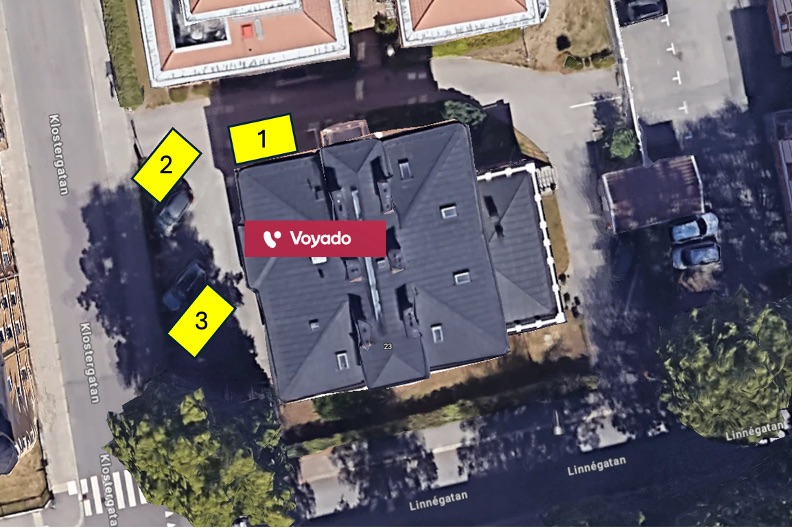
Monthly Overview
| Wk | Date | Spot 1 | Spot 2 | Spot 3 |
|---|
Your booking
Employee
Guest
Available
★ Latest Achievements
No achievements yet.
| Wk | Date | Spot 1 | Spot 2 | Spot 3 |
|---|
No achievements yet.
No parking information has been published yet.
Loading achievements…
Use these slash commands in Slack after linking your Slack user ID in Parkado.
Loading weekly description…
Set your Slack member ID so weekly reminders can mention you correctly in Slack. You can also paste a mention like <@U12345678>.
Go to your profile, press the three dots, select "Copy Member ID".
Click your name in the list below to swap weeks with a colleague or get help from someone.
Loading weekly plan…
This HTML content is shown to all users on the Information page.
Automatically book a spot every week for a guest (e.g. cleaners). These bookings are created when the date is first viewed and can be overridden.
Users appear in this list after signing in to Parkado. Admins can then assign them to the Linköping office and set roles.
The 10 most recent parking actions.
Loading…
Configure weekly responsibilities, Slack scheduling, blocked weeks, and Slack IDs for Linkoping employees.
Choose whether weekly responsibility follows the classic fixed rotation or the shuffled trial planner. Regeneration only updates future cycles.
Planning status will appear here.
Configure the Monday message rotation order. The selected variant changes by ISO week.
Used when the week is blocked. Each entry must include {message}.
Configure the Friday reminder rotation order. Each entry must include {mentions}.
Next 5 scheduled sends using the configured weekday, time, and timezone.
Preview will appear here.
Sample Slack output using local-office users with Slack IDs.
Preview will appear here.
These buttons post directly to the configured Slack channel. Each test asks for confirmation first and ignores dry-run mode.
Latest sent test message details will appear here.
Evaluate the backend Slack scheduling logic for a chosen timestamp without sending anything to Slack.
Dry-run output will appear here.
Exclude employees from future weekly rotation without removing their Linkoping office access or Slack profile management.
Loading excluded employees…
Slack IDs stay editable for all Linkoping employees. Excluded employees keep weekly access, but they are removed from the planning rotation until you include them again.
Loading employees…
Loading weekly logs…